Novera: The Bold and Modern Sans Serif Display Font
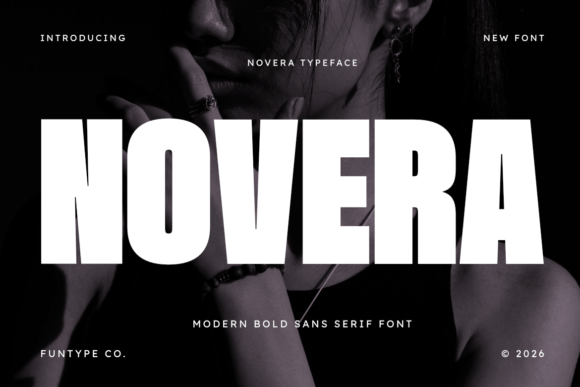
Novera is a striking sans serif display font designed to make a powerful statement. With its heavy weight, clean lines, and solid structure, Novera exudes confidence and modern authority. It's the ultimate choice for designers who need a typeface that commands attention and delivers maximum visual strength.
Why Choose Novera?
As an All Caps font, Novera is optimized for high-visibility headlines and branding. Its robust design makes it perfect for creating aggressive sports graphics, futuristic tech branding, or bold industrial posters. Additionally, Novera comes equipped with Full Multilingual Support, making it a versatile powerhouse for global projects.
Avoiding Common Mistakes with Novera
While Novera is a powerful and impactful font, there are common mistakes that can affect its effectiveness and overall presentation. Here’s how to avoid them:
Mistake 1: Overusing Novera in Text-Heavy Documents
One of the most common mistakes is using Novera in long-form text. As a display font, Novera is best suited for headlines, titles, and short, impactful statements. Using it for large blocks of text can make your document look cluttered and hard to read.
Better Approach: Use Novera for headlines and pair it with a more readable body text font like Arial or Helvetica. This combination will ensure that your document is both visually appealing and easy to read.
Mistake 2: Ignoring Spacing and Kerning
Another common mistake is neglecting the spacing and kerning of Novera. Proper spacing and kerning are crucial for maintaining the font's impact and readability. Tight or loose letter spacing can detract from the font's intended effect.
Better Approach: Take the time to adjust the tracking and kerning in your design software. Start with the default settings and make small adjustments until you achieve the desired balance. This will help Novera maintain its strong, clean lines and enhance its overall impact.
Mistake 3: Not Considering Context and Audience
Using Novera without considering the context and audience can lead to a mismatch in tone and style. For example, while Novera works well for sports and tech branding, it may not be the best choice for a more traditional or formal setting.
Better Approach: Always consider the context and audience before choosing Novera. Think about the message you want to convey and the expectations of your audience. If you’re unsure, test different fonts and get feedback from others to ensure the right fit.
Mistake 4: Neglecting Licensing and Usage Rights
One often overlooked detail is the licensing and usage rights of Novera. Using a font without proper licensing can lead to legal issues and additional costs. It’s important to check the terms of use and ensure you have the necessary permissions for your project.
Better Approach: Before downloading or purchasing Novera, review the licensing agreement carefully. Make sure you understand the terms and any restrictions. If you need to use the font for commercial purposes, ensure you have the appropriate license.
What to Check Before Using Novera
- Readability: Ensure that Novera is used in a way that maintains readability, especially in longer texts.
- Context and Audience: Consider the context and audience to ensure the font aligns with the intended message and style.
- Licensing and Usage Rights: Verify that you have the proper licensing and usage rights for your specific project.
- Compatibility: Check that Novera is compatible with the design software and platforms you are using.
By avoiding these common mistakes and following the better approaches, you can make the most of Novera and create designs that are both visually stunning and effective. Whether you are a beginner or a seasoned professional, Novera offers the professional edge your design needs.